Arduino Adventures :: Day 6
I had been thinking about how to achieve individual addressing using demultiplexers even before I gave Charlieplexing a shot. But during my preliminary research the stumbling block was that the largest demux I could find was only a 4 to 16. If I wanted to individually address 64 LEDs I would need four of these, thats 16 I/O pins required to drive them all (I only have 14 on the Arduino).
So that wouldn't work. I continued to mull about this because there was an itch in the back of my skull telling me it could still work. And then it hit me! As you may or may not know, demultiplexers have a given number of inputs to select which output pin to activate. But they also have an enable pin that can disable the entire demux (so no output pins are active).
My idea was to hook up all of the four demux inputs up in parallel with each other. So pin 1 for each demux would be hooked up in parallel together to one I/O pin on the Arduino, and same for pin 2, 3, and 4. So to drive all four demux's you only need 4 I/O pins on the Arduino. Now the problem with this of course is that if you select pin 8 for output, then pin 8 on every demux will go active.
My solution is to use a smaller 2 to 4 demux, and hook these outputs up to the enable pins on each 4 to 16 demux. So with only 2 I/O pins on the Arduino I can select which Demux is active, and only that one will have an output pin going active.
When all is said and done, I only need 4 pins to drive the 4x16 inputs, and 2 to drive the 2x4 inputs. Thats 6 I/O pins to individually address 64 LEDs 😀
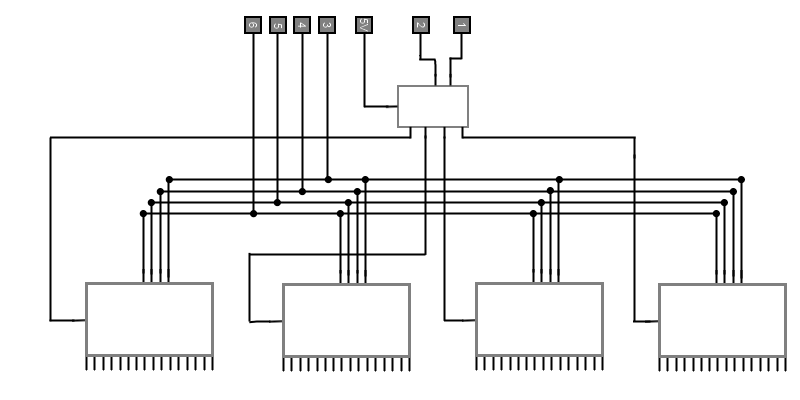
Now my previous exploration of Charlieplexing was far from a waste of time because it got me thinking about Persistence of Visionas a valid way of presenting a static image. Using this demux method for individual addressing of the LEDs, and Persistence of Vision to present a static image, I have a perfect method for engineering my display! Some bonuses of this method over Charlieplexing are:
- The circuit complexity increases linearly as you add more LEDs
- LEDs always get the same amount of current
- The layout lends itself very well to being in a grid!
So with this rough sketch I set forth! It's a real shame that "The Shack" (Formerly known as Radio Shack, they re-branded them selves, seriously) doesn't carry the stuff they used too. They have just a single cabinet of fairly worthless components. It's a real let down. So finding ICs and other small electronics is a real pain these days. Ordering them from sites is an option, but it took some research to find sites that sell in small quantities. I did find a few good ones finally. Shipping time and cost kinda suck, but what can you do.

The first issue I ran into was that nearly every demux was active LOW. Meaning, all unactive output pins were putting out 5V (HIGH), and when you activated one, it would go to 0V (LOW). Thats fine if you have a logic circuit that is all active LOW. But in my case, that would mean that every LED would always be on, and when I addressed one of them, it would actually turn OFF... Not what I wanted 😛
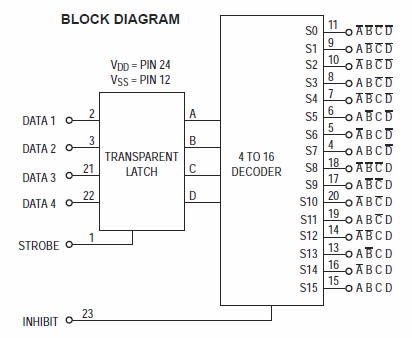
So the only one I found that was active HIGH had a 4bit transparent latch for the input. Not a big deal, kinda cool actually, but it means I need an extra I/O pin for the latch strobe. That puts me at 5 pins rather then 4 for the 4x16 demux's (since i will be hooking all the strobes up in parallel as well), which makes it 7 pins total, well within bounds. The inputs were active HIGH as well, but oddly the enable was active LOW. So if I'm pushing 5V (HIGH) into the enable pins, it DISABLES the demux, and if I drop that to 0V (LOW) it ENABLES the demux.
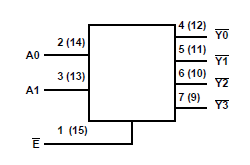
This actually worked to my advantage because every 2x4 demux i could find (whos output would feed into the 4x16 demux's enable pin) were active LOW logic, so every output pin would propagate HIGH until I activated one, which itself would then go LOW.
2 to 4 Demultiplexer : CD74HC139E
4bit Transparent Latch/4 to 16 Demultiplexer : MC14514BCP
As I was saying, the thing that sucks with Radio Shack and every other small eletronics outfit going the way of the Dinosaurs, is the shipping time. If i got a dead IC, or burned one out my self, I'd have to wait another two weeks for a replacement. So i ordered double of everything I needed. (Each IC was only like $0.75, so not a big deal). And to be extra careful, I'm ordering IC sockets, so I won't be soldering the ICs directly.
Now I ordered and received the demultiplexers already. And hooked one of the 2x4s up to my Arduino to test it all out. I haven't worked with ICs let alone demux's in years, so I wanted to test out my self as well as the hardware, to know for sure they all work:
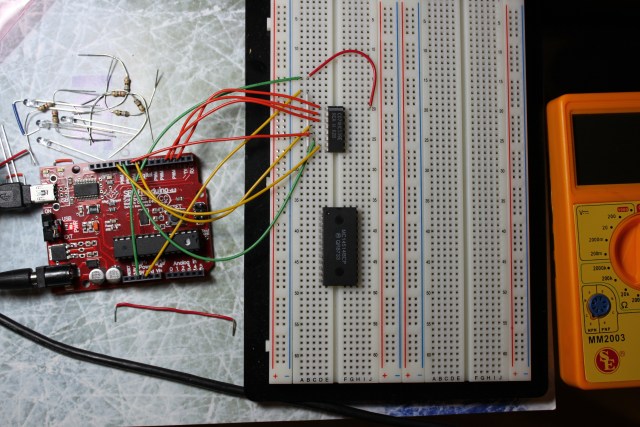
This is being controlled by my computer via serial input, so i can flip the inputs manually, and see the output state instantly. I plan on modifying the program to run through each state automatically and verify the output for each input state. Sort of unit testing the ICs. Then I will do the same for my 4x16's.
Still quite a bit to do before I'm ready to begin the build, but it feels good to have a solid design finally.
Arduino Adventures :: Day 5
As I stated last time, I had decided to try out Charlieplexing as a way of individually addressing 64 LEDs with only 14 I/O pins (9 is all I need for this actually). So I ordered some resistors and some very specific LEDs. Before I get into the build, let me give a high level overview of what Charlieplexing is and how it works, so that you can understand the conclusions I came to later.
Charlieplexing was invented in 1995 by Charlie Allen as a way of driving many LEDs with few I/O pins and nothing but resistors to implement it. It relies on two facts about LEDs:
- That they are diodes, thus electricity will only flow through them in one direction
- That they have a specific "operating voltage", below which they will not light up even if current is flowing through them
( Instructables has a really great in-depth explanation here. )
Simply put, you hook LEDs up in combinations such that electricity will either not flow through certain LEDs due to the fact they are diodes in the wrong direction, or that electricity will flow through ones you don't want to light up, but not enough current to actually light them:
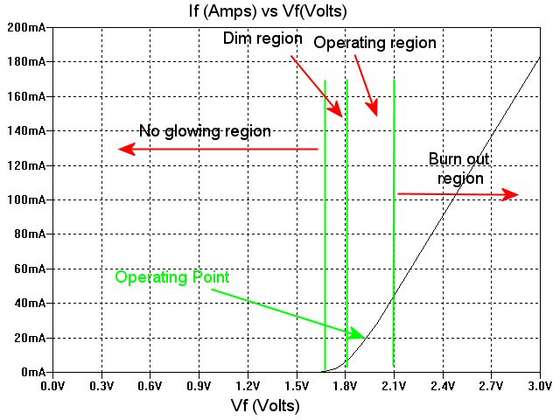
When all is said and done, only one LED will light up at a time. Thus, individual addressing:
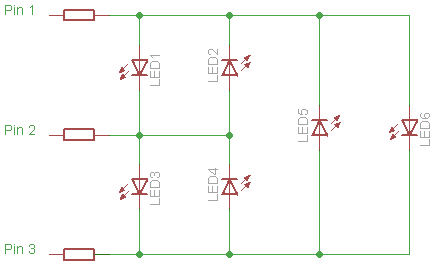
Now the more astute reader may have noticed I just glossed over something. Yes I can turn individual LEDs on by themselves, but as is dictated by the circuit, I can not turn on all the LEDs at once, in fact not even a third of them, and in practice, you can actually only turn one LED on at a time using this method, which sounds pretty limiting. But there is a way around it: Persistence of Vision.
I'm sure you've seen it used some where before but not known it. The idea is if you can turn a light on and off fast enough, the human eye won't be able to perceive that it was ever actually off, and thus it will look like it is always on. So to make this useful, you "schedule" all the lights that you want to be on, and then the software scans through and turns each one on and off in succession, when it gets to the end, it starts over. You have to be able to scan through the lights enough times per second to fake out the human eye:
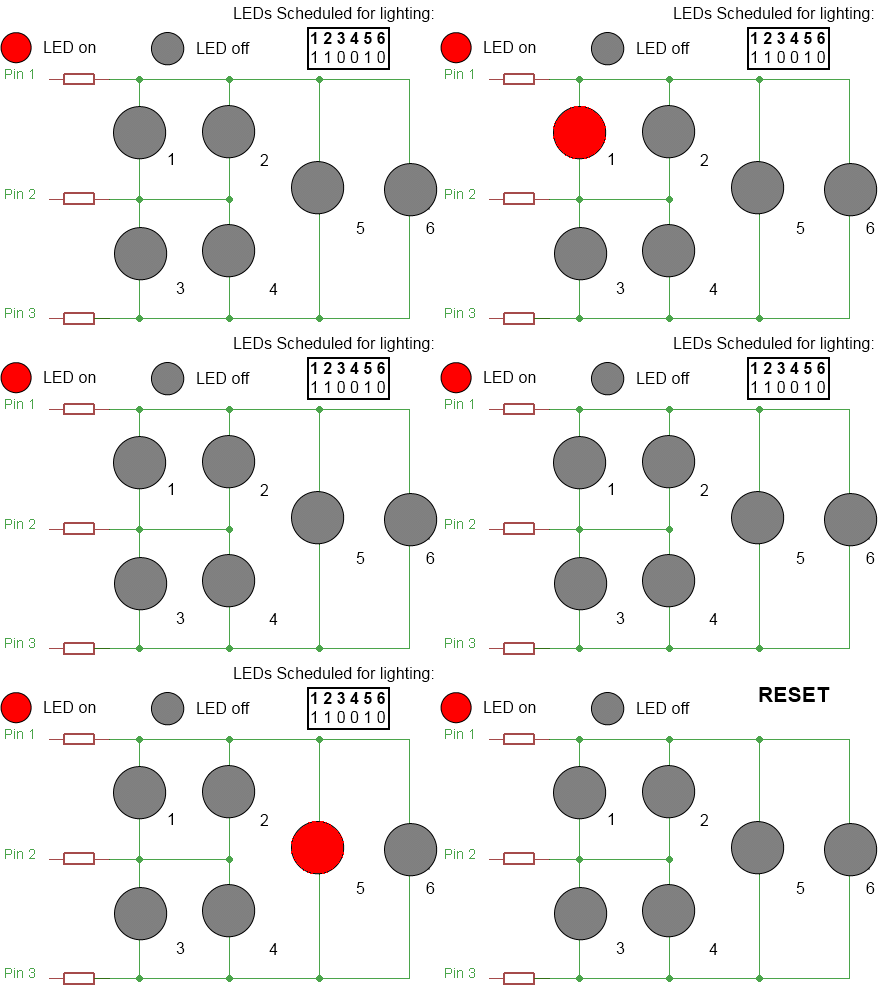
So with all that, I set forth to implement a prototype on my breadboard, and have a video of it here (it look a long time to make, not because it's long, but because I suck with the video editing software, so give it a watch 😀 ).
Now this whole research and prototype cycle allowed me to draw some important conclusions. And they aren't favorable for Charlieplexing 😛
There are some small issues that make this method problematic for my application.
The circuit layout does not lend itself to have the LEDs in a grid. It could be designed around, but would be a real pain. This isn't a big one, but it's certainly a consideration.
As the circuit expands with more pins, and you want to have more LEDs on at once, I found the LEDs got dimmer. This could be for one of two reasons (or both). It could be the fact that the circuit itself is larger and has more resistance built into it over all (and the current is being split many different ways), and the more LEDs are scheduled to be on, the longer each LED will be off for during a given "scan". Now you can counteract this, by using lower ohm resistors to increase the overall current in the circuit, but then you run into the issue of the "compliment drive" LEDs lighting up dimly when they shouldn't.
And that last issue is a problem I ran into even in my small circuit.
So where does this leave me!
Well it leaves me out in the cold as far as Charlieplexing is concerned.
But I got to thinking... my original idea of using demultiplexers could still work, so that's where I am at, I have a few ideas I'm going to explore on paper, and I'll post when I have something concrete.
Arduino Adventures :: Day 4
So I've been thinking about what I want my first big project to be, tossing around a lot of ideas. Trying to balance complexity & difficulty VS coolness. (Also, I want the project to be fun to make!) One of the things I've been interested in doing ever since I heard that you could do it at home, was acid etching your own circuit boards, so I wanted that to be a part of the project too.
With those requirements in mind, I finally settled on a project: John Conway's Game of Life. I've written two different versions of it in software previously:

I am absolutely fascinated by the whole thing. At one point I was in the planning stages of a hardware based version using only logic gates. But the complexity was astronomical, I would have ended up building an ENIAC sized machine 😛
But now with a micro-controller to do all the heavy lifting, it's feasible! With that as my goal, I began planning and research in earnest. So what do I need. Well all I really need is a way to display a grid. There are some LCD screens you can buy and hook up, but thats no fun, and doesn't look very cool. So I began looking into LEDs.
Now, in the software version I wrote, the longer a cell had been alive, the more it's color would change. So I wanted multi-color LEDs that I could modulate the color on. The plan was to have a grid of NxN multi-color LEDs. But after thinking things through a little, I decided I had enough issues to deal with anyway, without adding in the whole analog aspect, so I opted for digital (one color, on or off) LEDs.
My next step was to prototype. I needed to determine what the value of N would be. This would determine a lot about the circuit complexity and how I would go about implementing things. Now in the theory behind the Game of Life, the grid is infinite, there for the larger your actual grid is, the more interesting the result will be. So size is key.
The grid in my software version is 64x64. But after looking at things from a hardware perspective I figured roughly 8x8 was the largest I could manager. So I tweaked my software to be 8x8 to see if it was still interesting. It wasn't...
Until I wrapped the world that is! (So each edge is connected to each other edge.) Satisfied that it could still be interesting at 8x8 as long as the edges wrapped to each other, it was time to start thinking seriously about how I was going to implement this in hardware.
The key here, is I need to be able to individually address each LED. An 8x8 grid means 64 individually addressable LEDs, but the Arduino only has 14 digital I/O pins! (and even less analog I/O pins.) So the question became: "How to drive 64 LEDs with only 14 digital I/O pins?"
The first thing that jumped into my head was multiplexing (well, demultiplexing to be accurate). But that meant researching and ordering ICs, and during some research on the interwebs I found a possible alternative called "Charlieplexing". No ICs were required, just a few current limiting resistors. It allowed you to address N(N-1) LEDs where N is the number of I/O pins. Thus with only 14 pins, I could address 182 LEDs! (Plus the circuit looks fun to design)
So I ordered parts for that: 100 red LEDs and some 68 and 82 Ohm resistors (I'll get into why that is later) and I will write up another entry on that build soon 🙂
(Probably do a video too, I'm still exploring video editing software, trying to figure it all out.)
Arduino Adventures :: Day 3
It's time to do my first actual Arduino project!
This is a very simple one, but taught me some very important lessons about physical computing. Modern computers do tons of things so that we as programmers don't have to worry about all the random chaos in the real world. But in physical computing, small micro-controllers like the Arduino don't have the complexity to handle these things, so we as the designers/programmers must handle them our selves.
Take a look and see what I mean:
[I also took this as an opportunity to try making a real video about it. Still learning the best ways to record it all, and splice it together, so some parts of this are rough.]
Arduino Adventures :: Day 2
After talking with a few people who saw Day 1's pictures, I tried a different technique, and it worked so well I didn't get a single Cold Solder, and finished the entire board in the time it took me to do just 10 pins last night!
The finished product!
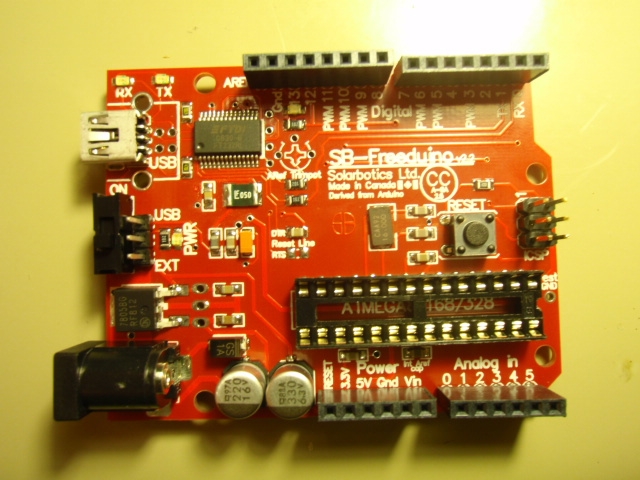
Those are some nice solder joints!
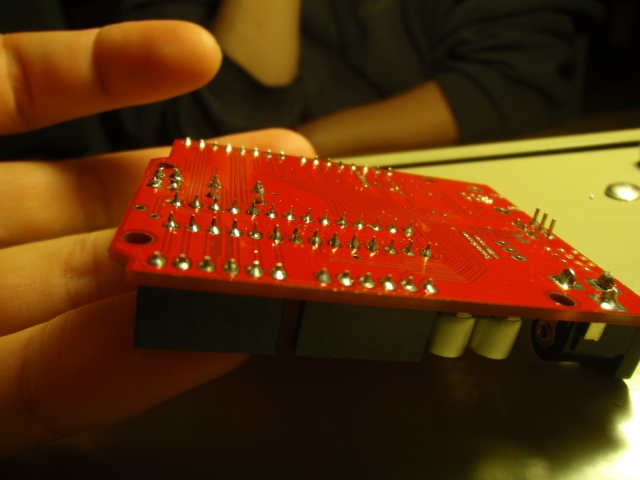
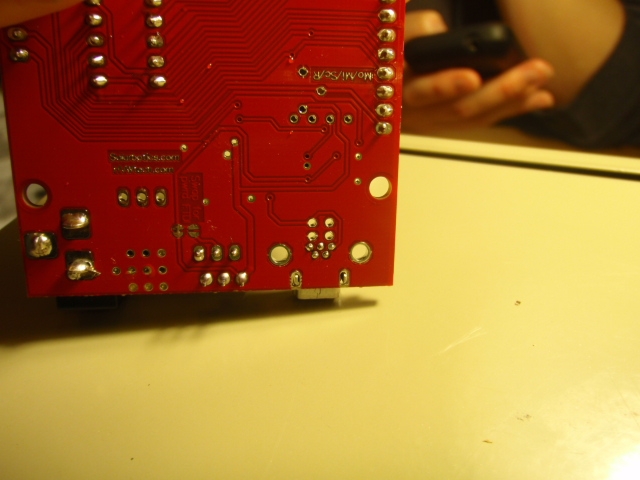
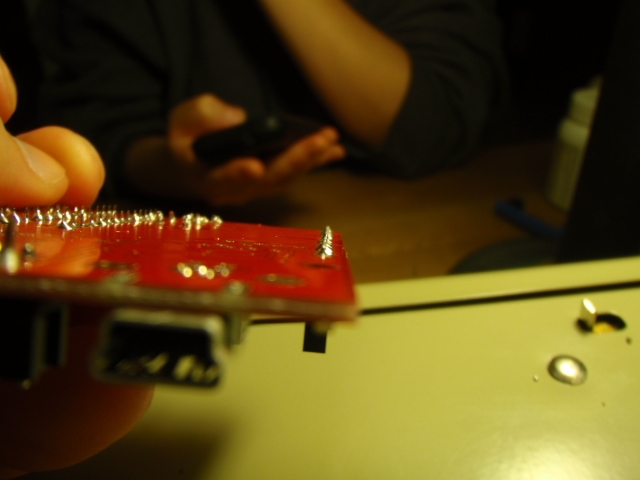
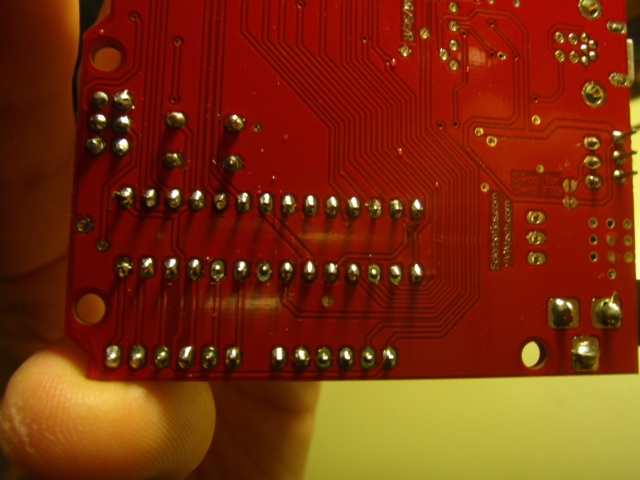
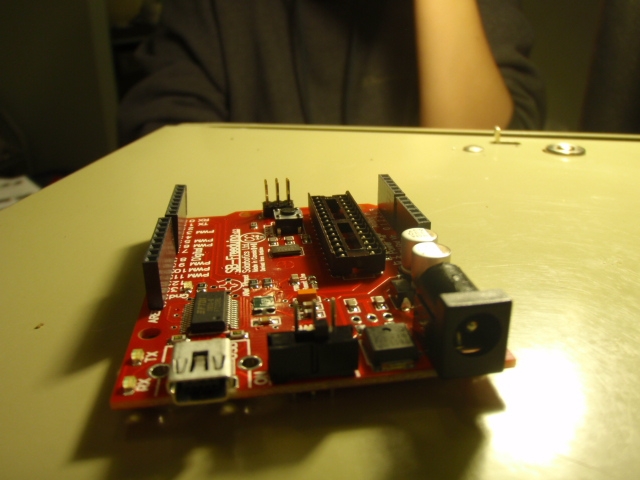
Plugged in for the first time, and Win7 found the drivers w\o any help, I'm kinda impressed!
Running my first program! (it just toggles 1 of the digital outputs High (5V) and then Low (0V)) and I hooked up an LED so it would look pretty while doing it:
I disected an old XBox controller and extracted the 2 rumble motors. Then I hooked the larger of the 2 up to the digital output that my program is toggling:
Now I am going to run through some of the tutorials and stuff to learn all the little ins and outs of programming this thing, and then I can start coming up with some cool projects!
Arduino Adventures :: Day 1
The encryption is coming along very well. All the key generation, and calculation and actual encryption/decryption is 100% done and working, and I have over come most of the hurdles in rendering it all. But as my project A.D.D. dictates, I'm taking a break for a little bit, to do some electronics stuff...
I've had an interest in electronics projects ever since I was little when I had one of those 300 in 1 Electronic Projects kits:

In recent years I've had a real hankering to get back into it and do a hardware project, but for one reason or another, all of my ideas for projects had some fatal flaw (cost, complexity, time, ect...) and none of them have ever gotten off the ground.
Thats why when I found the Arduino, I jumped at it, not even having a particular project in mind. It was a cheap micro-controller (about $30), both simple to assemble and use. Yet it had a huge open source community that produced tons of add-ons, so it was flexible.
I ended up spending about $80 to get the micro-controller, plus a book, wires, resistors, LEDs, Bread Board, and a few other odds and ends in this bundle which I can't recommend enough.
Now I had never actually soldered before (except for that one time in 8th grade when I tried to mod my Playstation. It didn't go well...) so I had to buy a Soldering Iron as well.
Now with everything I needed, I set to building the Arduino. All the hard, very tiny parts are already on, but there is still some assembly required 😉
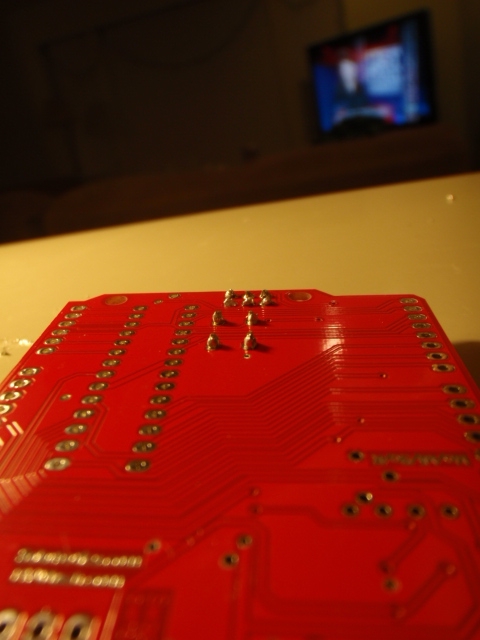
I only soldered 10 pins tonight. A few of them came out ok, but many are Cold Solders:
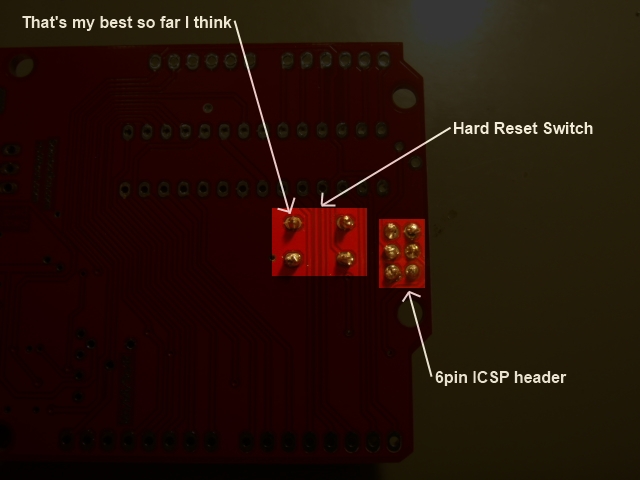
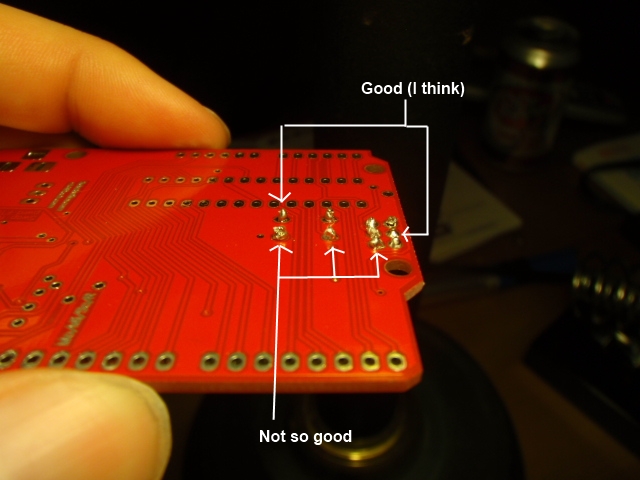
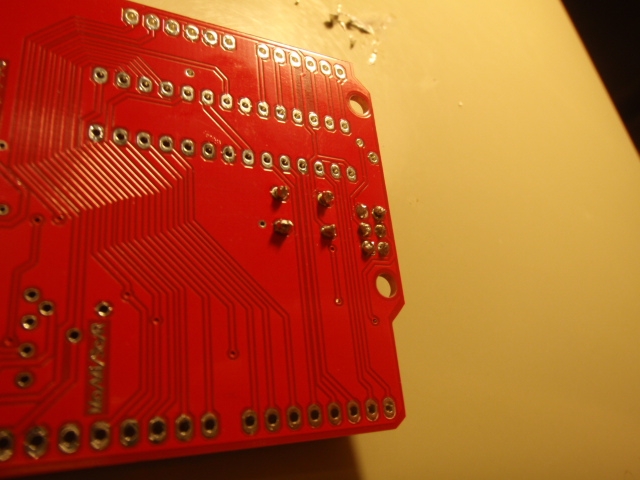
Stack Overflow

Me on Flickr
Archives
- May 2012
- March 2012
- February 2012
- January 2012
- December 2011
- November 2011
- October 2011
- September 2011
- August 2011
- June 2011
- May 2011
- April 2011
- March 2011
- February 2011
- July 2010
- March 2010
- February 2010
- September 2009
- May 2009
- May 2008
- November 2007
- October 2007
- September 2007
- July 2007
- May 2007
- April 2007
- March 2007
- February 2007
- January 2007
- December 2006
- November 2006
- October 2006
- September 2006