Oceans Unleaded!

[ A bit late on this post, but as the guy in Ghost Busters 2 said when the Titanic arrived in New York... Better late than never. (What? too obscure?) ]
So my friend and I have released our first Android game!
[Android Market Link] Oceans Unleaded
[Android Market Link] Oceans Unleaded Lite
It is small in all respects. We intentionally picked a very simple game so we could focus on refining our process of working together, and the tech and idioms specific to Android, and how the release & advertising process works.
However, while small, we still wanted it to be a quality and polished effort.
And I'm happy to report that I think we succeeded gloriously in all areas 😀
It's a fast paced "whack-a-mole"-esque game set under the surface of the ocean. There's a circuitous mess of oil pipes which... low and behold... begin springing leaks! You must rush around and fix the leaks as fast as possible. As the oil content of the water rises, the poor fishes who are swimming around die and float to the surface 🙁 Poor fish.
And no matter what you do, you always lose. (It's sorta like the helicopter game, you always lose, but you're trying to beat your previous high score for how long you stayed alive).
There are a few extras thrown into the mix, like a supply plane that drops power ups randomly. And a rescue boat you must find when you run out of bandages for fixing pipes. But like I said, it's a small game in all respects.
There are a few interesting things (at least I think so) technically that bear mentioning. The game is written entirely in Java, based on a great library called libGDX. GDX abstracts away the platform specific stuff (Think SDL, or SFML) and provides back ends for PC & Android. The great thing is that you can develop right on your computer, run and debug right on your computer (much nicer than debugging over the USB link) which makes iterations MMUUCCHH quicker.
As GDX develops it's starting to provide a robust set of base classes for game development. Which is even nicer than it sounds because the GDX author is a performance Nazi! (You know... the good kinda Nazi) Always benchmarking and improving. So if you go that route you really will get the best performance possible out of Java. And the heaviest lifting is done in native Android back ends.
For this project, the team was just me (programmer) and my friend Mike (artist/anything creative). We have already started pre-production (doing a much more robust planning stage this time around) and have brought in a long time friend of ours who works in the AAA industry to do art and game design. We're learning a ton from his experience and adapting some of the process he has seen that work well. (Still keeping the process pretty light weight as this is just a 3 man side project.)
With both of these artists though we officially have WAY more asset bandwidth than technical bandwidth. And our next project is a fair bit more ambitious which worries me. So I'm mulling over the idea of a 2nd programmer. For side projects I've found it exceedingly difficult to find competent programmers who have both the desire, and time to devote. Which is to say I've never found a programmer with those 3 elements 😛 Also if there is going to be money involved (which we sure hope there will be lol) then it gets more difficult bringing in someone you don't know. There can be some sticky legal issues down the road.
Well anyway, I'm really rambling now, so go give our game a try if you have an Android phone!

The Call of the Dark Side
So I've been working on a little Android game for a while now. Mainly as a first effort, small scope, learn the technology sorta deal. So it's pretty simple in concept.
Anyway it's getting to the end of development now, mainly just polishing and tweaking, so I decided to take a crack at making an ad supported version. Generally Ad Mob is meant to integrate with standard Android UI elements, and not just an all encompassing OpenGL ES canvas, so it look a little shoe horning to get it in there, but it's in now.
I had been loading it up and trying it out, clicking the ads and testing how well my app resumed and such. And then I looked at my Ad Mob account... I had made $0.02!!! That's real money! I mean not a lot obviously, but man! I was expecting like $0.00000001 or something! I mean after all it had only been me messing around for a few hours testing my app!
Now up until this point I had been taking care to only show ads in non-intrusive places, like on the menus, or only after you died in the game. But man! For a moment I had a flash of "holy cr@p! I could make real money off of this! Lets put ads EVERYWHERE!!!!"
I started rationalizing to myself how I could display ads during the actual game play, and I could use Ad Mob's feature for interstitial ads ( for those of you that don't know, an interstitial ad is one that takes up the whole screen and is usually placed in the middle of a flow between screens and must be manually skipped to continue on to the next screen, they are terribly terribly annoying ) to get even more ads in there!
I began tweaking some things and then stopped myself. I know how I feel about ad supported software to begin with. And especially software that's just crammed with intrusive ads all over the place. Usually doesn't stay installed on my phone too long.
I want this to be software that I would want to use. I want it to be a quality (if small) game that can still make at least some money. I plan on releasing the ad supported version along with a $1 ad free version. I feel like that's the best compromise. And one that I would be happy with as a consumer & gamer.
But man... wouldn't it be awesome to see that # in Ad Mob go way up 😉
Another one bites the dust…
Welp, funny timing my last post about there being no good Android phones at the moment.
My trusty side kick, the Motorola Droid has decided to die...
Not entirely mind you, but the touch screen is becoming unusable. The bottom left corner in fact. The hardware "back button" is the most affected, working almost not at all, but also anything in the lower right hand part of the screen has become very unreliable.
You wouldn't believe how critical your back button is until you don't have it 🙁
Anyway, my phone is pretty critical to my every day life as well as development (I've been working on an Android game which I will post about soon.) So I had to replace my phone. Since it was rooted, and I had canceled my phone insurance after the last time I had to deal with them (miserable experience), I was a bit out of luck, and had to buy a new phone on my own.
Being about 4 months out from my upgrade period, and not wanting to pay full off-contract price on a last-gen phone, I turned to EBay 😉
I picked up a Droid Incredible for $199! Not too bad for off contract! And when I do finally upgrade to a sweet new next gen phone, I'll have this for testing purposes 🙂

No good Android phones on Verizon…
I've had my Droid for about a year and a half now (got it the day it came out) and all though it has treated me well, it's getting quite old in "phone years".
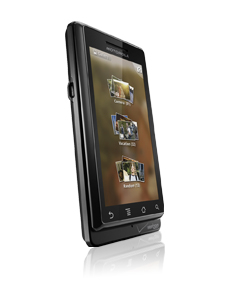
I'm not due for an upgrade until July, so it's not a pressing issue at the moment, but while musing on what I might get when it's time, I have come to the conclusion that there really isn't any Verizon Android phones in the near future that look compelling.
Probably the most interesting phone currently is the Motorola Atrix 4G, but of course that's AT&T.

HTC's up coming phones are decidedly last-gen, lacking the hardware sensors that 2.3 brings to the table, and shipping with 2.2.
The Sony PlayStation phone (Xperia Play) is fairly interesting to me for it's performance and how up to date it is with 2.3's hardware features, I feel like it will be kept up to date as new versions of Android roll out, but that's admittedly based on nothing.
And then there is the news that Netflix simply won't ship apps to phones with out hardware DRM support. Meaning ALL current phones will never get Netflix streaming. And more than likely all the phones currently in the pipe line will similarly never get Netflix. This is actually kinda a big deal to me, I'm a Netflix addict!

On the same vein, the Motorola Xoom, while very sexy from a lot of stand points, will NEVER get Netflix! And at least for me, it's primary use case would BE streaming movies!

Now Qualcomm has recently announced a new rev of the Snapdraggon line that included hardware DRM, and Netflix has given it it's blessing, so thats great news, but they are only now shipping samples to manufacturers, which means we most likely won't see handsets with it till NEXT YEAR! Suck!
And none of the other SOC manufacturers have even announced a similar solution yet. NVidia already release their road map through early next year, none of which included hardware DRM, and that's just the SOC release schedule, not end user devices including them. TI to my knowledge has not released a road map showing so far out, but we can assume they have at least the rest of this year planned out. All this means is we probably won't see wide spread Netflix support till the end of 2012! SUCK!
As a small side note, I'd been down on Qualcomm for their less then stellar GPU they saddled their Snapdragon SOCs with, but the new rev of their GPU is a whole different ball game, it's goes head to head with the Tegra 2 and holds it's own, so I'm very interested in the next generation of phones based on this SOC.
But I digress...
The last thing that weighs in on my decisions is both UI customization (I don't want any!), and time-to-update when new versions of the OS come out. Google's own handsets get updated very quickly, but they never come to Verizon. Both HTC and to a lesser degree Motorola manage to update their handsets, but pretty much every other manufacture has a MISERABLE track record.
So where does all this leave me...
I guess what I really want is a Nexus X, Google made, Verizon loving, stock UI, always updated hand set, with Motorola's industrial build quality, and hardware DRM for my precious Netflix... Let me know if anyone sees one laying around 😛
Silly Encryption Schemes: Part 2
Well this project didn't go as I had planned. Every part of it took about ten times longer than I expected. And in the end, it still didn't function exactly the way I wanted.
First some fun media to show what did work 🙂
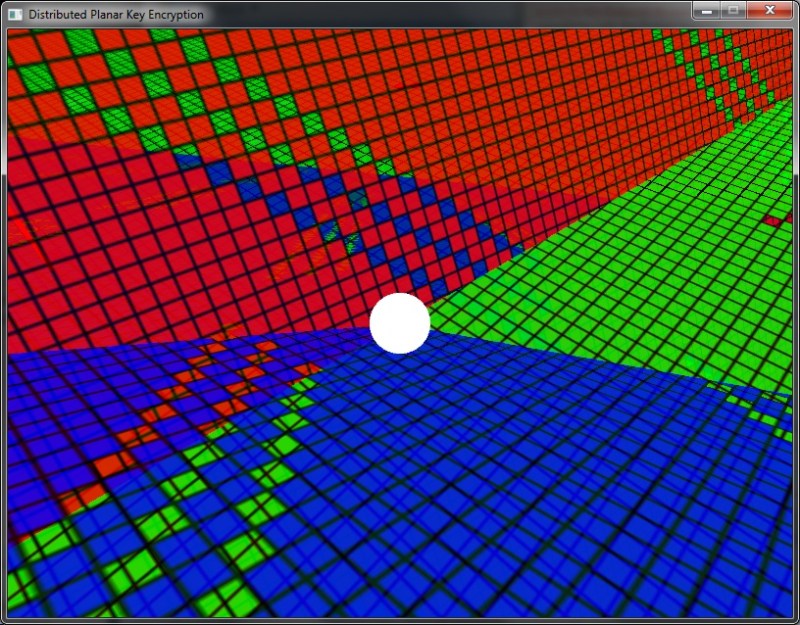
Also a short video of it:
YouTube: Distributed Planar Key Encryption
Now let's start where I left off in part 1.
My first task was to come up with the method I would use to intersect my 3D planes. This was actually a fun exercise for me, and this is what I came up with:
Given 3 planes (Pa, Pb, Pc) first intersect Pa and Pb, resulting in a linear equation, giving any point on the line of intersection generated by Pa/Pb. Then using this linear equation, intersect that line with the third plane Pc, and generate the unique point of intersection.
I coded this up using floating point math, and the whole thing only took two or three sessions to get implemented and debugged, but it was actually pretty fun.
Next up, I needed to port my Planar intersection algorithm to fixed point math. To do this I had implement a minimum number of fixed point math operations... this took a while.
I read up on Fixed Point math and began implementing the most basic operations. But then, I realized I needed to implement others such as sin, cos, square root, and that's where things got messy.
For those of you who don't know, Fixed Point math (also referred to as Scaled Math) is simple enough in theory. Take for instance the number 3.14, if we wanted to represent this using integers and not floating point data types, we have to get rid of the decimals. Well the easiest way to do this is to just multiple it by (in this case) 100, making 3.14 into 314.
Now lets say we wanted to add 1.0 to 3.14, but in fixed math, we would need to move 1.0 into our new fixed point math space, again, by multiplying by 100, so 1 obviously becomes 100. Now we add them: 314 + 100 = 414
All pretty logical and easy. And now, if we want to go back to decimals, we just divide by our base (which is 100 in this case) making 414 / 100 = 4.14, so as you can see, things worked out, and we did all our calculations (only addition in this case) in integer math, instead of floating point math, meaning it's 100% deterministic! (aka: the whole reason I'm doing it this way)
So why is it called "Fixed Point Math"? Well when we use 100 here, we are essentially saying that our number will have two decimal places. A Fixed Point "1" in our system here is represented by 100. A Fixed Point 0.5 is represented by 50, like wise a 0.01 is represented as a 1. So how do you represent 0.009? You don't. That's the draw back of Fixed Point math. You have a Fixed number of decimal places, and anything below that is simply lost.... It gets worse.
Let's take a look at Fixed Point multiplication: 3*3 in our system this will look like: 300*300. Now we all know our answer should be 9 (or 900 in Fixed Point), but what happens when we multiply our Fixed Point representations? 300*300=90,000! It's off by a factor of 100! Well that number is familiar, isn't it! See our Fixed Point base number is in the multiplication as well, if you break it down: (3*100)*(3*100)
The fix is simple enough, just divide it out when you are done, so our fixed point multiplication now becomes two operations: (300*300)/100=900
Bbbuuuttt... You don't get off that easy. Let's take a more real world example. I used 64bit ints, and I needed much greater then 2 bits of decimal precision. When you are making a Fixed Point math system on a computer, you need to take into account your actual data type, and realize that each bit of decimal precision reduces the whole number range of your variables. Let's take a look:
Let's use 8bit ints here. This is what a 1 looks like normally:
00000001
Now lets say I want 4 bits of decimals, my one is going to sit here:
00010000
That's the binary representation, but it's still the same thing, our scaling factor, instead of being 100, is now 16 (in base 10).
Now back to the problem of multiplying our numbers which contain the scaling factor. Here we only have 4 bits of whole number precision. The largest whole number we can represent is 15. So, if during the course of multiplication we ever exceed 15, we will over flow our data type, and lose very significant parts of our number. We must prevent this, if at all possible.
It doesn't take much number crunching to realize, that because our multiplication will be off by a factor of our scaling factor, relatively small numbers, when multiplied together, will overflow our data type before we ever get a chance to divide the scaling factor out.
Luckily there is a generally accepted solution to at least try and mitigate this. Since we are using binary instead of base 10 to define our scaling factor, we can use simple binary bit shifting to attempt to alleviate this (this could be done with division, but this is simpler since we are using binary anyway). If we shift each operand in our multiplication to the right a few places, we can reduce the size of the scaling factor that goes into the multiplication, and thus reduce the likelihood of overflowing. So in this example, let's shift each operand 2 places:
00010000 becomes 00000100 (aka 4 instead of 16) here we've halved the scaling factor. Now in an equation:
2 * 2
in Fixed point:
(00100000 >> 2 ) * (00100000 >> 2)
becomes
00001000 * 00001000 = 01000000
And there you go! We pre-shift half of the scale value from each, so that when multiplied together, the scale value repairs itself, and we avoid an overflow in many cases.
SO! Why have I dragged you through this? Because this is the part that ruined my encryption!! Obviously, the pre-shifting knocks off 2 bits of decimals here, so whatever their value was, is lost! This is an accepted drawback of Fixed point math, but not for me!
In my actual implementation I have 64bit ints, with 16bits of decimal precision, and 48bits of whole number range (clearly range was more important to me then precision. My scaling factor is 65,536) which means I pre-shift by 8bits during multiplication.
Here's the problem: if I multiply 3.141592 by 12.345678 I will get a different number than if I multiply 3.14 by 12.34 ( 38.78508323 vs. 38.7476 ), that's a difference in the hundredths place! That's fairly significant! Now if I take that result and feed it into another part of an equation (as happens many many times in my equations), that difference will propagate through along with other inaccuracies, and the final number will be greatly effected by each inaccuracy.
You might say "Why is this a problem, Adam! you knew Fixed Point math was inaccurate when you started this!" and the answer is, because I didn't have the foresight to realize this wrecked the communicativeness of equations!
Using the example above, let's say the result is then multiplied by 8.765432, in theory:
3.141592 * 12.345678 * 8.765432 == 8.765432 * 3.141592 * 12.345678
But because of how the inaccuracies propagate through from one operation to the next, they don't equal each other!!!
So what exactly does this destroy for me? Well if you pass my Planar intersection algorithm 3 keys, it will generate a 3D point (the encryption key).
If you give the algorithm Pa, Pb, Pc, it will create a linear equation for the intersection of Pa/Pb, then intersect that with Pc. The point generated from that will be used to encrypt the file. NNnnnoooowwww if I want to decrypt the file, and I provide the keys in ANY OTHER ORDER (such as Pb, Pa, Pc) the inaccuracies propagating through the equations will result in a significantly different point! Thus when it is used to decrypt the file, the decryption will fail!
It gets worse! Another central tenet of the algorithm is to be able to generate more than 3 keys, and use any 3 of the keys to generate the parent encryption key, but because of this problem, using ANY KEYS OTHER THAN THE ORIGINAL, in ANY ORDER OTHER THAN THE ORIGINAL will never generate the proper 3D point!
I didn't realize all of this right off the bat. I wrote my Fixed Point math, I even implemented the more complex functions: sqrt(), sin(), etc... And moved on.
The encryption itself is actually just a simple XOR. I take the 3D point, parse each component to a string, concatenate them together, and then use CryptoPP to create a secure hash (high randomness, low redundancy, low collision rate), which I use as the bit stream for my XOR encryption. Not terribly secure, but the whole point was the key generation, not the encryption itself. So I was ok with it.
Then I went on to make the 3D view of it all, so it would have "Hollywood style" graphics. I added a "lookat()" function to my camera and learned quite a bit more 3D math in the process of creating and orienting the 3D Planes. All in all, I learned a ton on this project. But when I realized the problem with the math, I became very disheartened, so the 3D View is a bit unfinished... I had intended to do more. But I don't want to now.
Now I'm sure, that given enough time, I could eventually solve these problems. But this is a project with absolutely no practical application. It's demo-able, and I've learned a ton. So it's time I move on.
Time to get back to some actual game development 🙂
P.S.
If you'd like to try it, you can see the project page, and download it directly here (source is included, it's ugly).
Back to the grind
Welp, I'm back from my vacation. Actually I got back over a week ago, things have just been really busy.
Some cool photos if you are into Mayan ruins or caves (this pic links to the whole gallery):

Anyway, easing my self back into things I finally finished up a long time (non-technical) project:
Paper Craft - Mad Cat (BattleTech)
You can see the full build log here

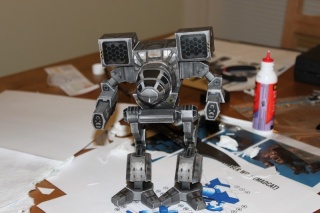
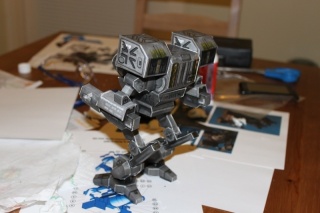
(I'm a big BattleTech fan, just started reading the Blood of Kerensky series, any BattleTech fans here?)
I also finished up my encryption project, so I will have a postmortem on that soon, as well as progress on my Arduino hardware project. So keep reading! 😀
Arduino Adventures :: Day 7
So on my last post, benryves pointed out that I might be able to use some of the Analog input pins as Digital I/O pins. And as it turns out, he's right. I could swear I read some where that you couldn't, but I was wrong.
Well this put my design in a bit of jeopardy, not because it was wrong or wouldn't work, but just because it might be unnecessary, which would make it kinda silly.
And for a 64 LED circuit, its actually a bit overkill. Because I could hook up four 4x16 demux's and address them just fine with only 16 pins. But if I wanted anything more than 64, I would be out of luck. Since I have had plans for larger arrays all along, this made me feel a bit better about my design. But to make my self feel even better, I made my self a bunch of graphs on how my design is superior to straight demultiplexing 😛
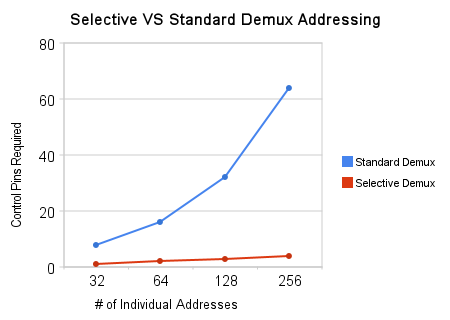
(Efficiency in terms of LEDs per Input Pins increases as you add more pins)
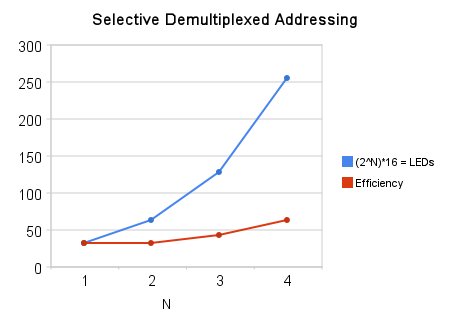
So, being softly reassured by my graphs, I turned my attention to the build.
I still needed quite a few things to manufacture the circuit board. I needed a way to drill the holes in the board. I needed a way to get the circuit design onto the board precisely, and so on. So I did some research and bought some tools! (Who doesn't love power tools!!)
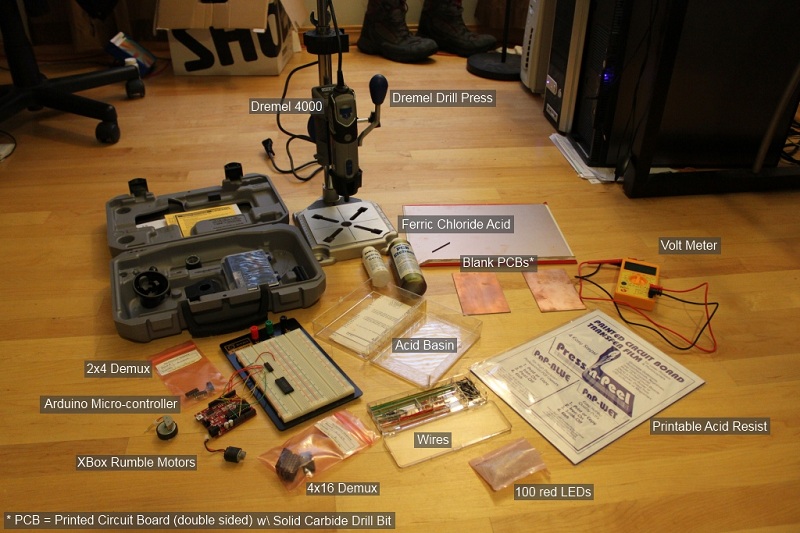
I had read that high RPMs (around 30,000) was key to getting clean precise holes on your boards, and the Dremel 4000 has variable RPM control that can go up to 35,000 RPMs, so I should be good 😀
Also, the printable Acid Resist allows me to design my circuit on the computer, and just print it out, and apply it to the board, very precisely, so that's nice.
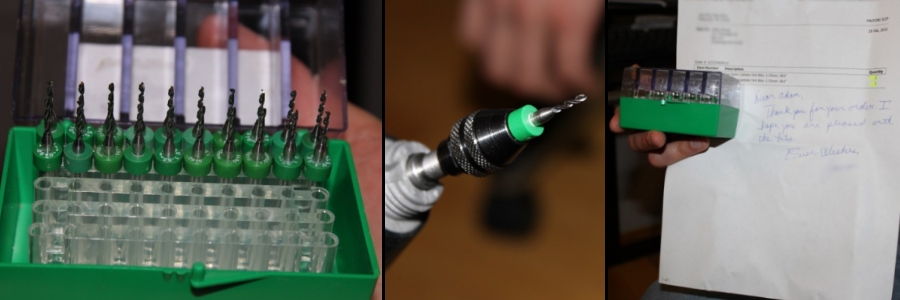
For drill bits, all the reading I did mentioned that I would need Solid Carbide Drill bits to really drill precision holes, but they were $5 a bit! So after some quick searching I found a few on E-Bay selling military surplus ones for mmuucchh cheaper:
With all my new tools, I finally got around to designing the actual circuit board. And wow... I under estimated this. It was not trivial. And it's still not perfect.
First thing is, I have these two 3"x5" blank PCBs that I want to use as practice before I etch the much larger 9"x12" blank that I have. So I wanted to design a paired down version of the circuit that would fit on the smaller one. So here it is. This is the actual circuit, but it only has half the outputs that the final one will have (32 instead of 64, there will be two more 4x16 demux's in the final one). And on this one I have all the LED leads on the edge of the board since this is only for testing purposes:
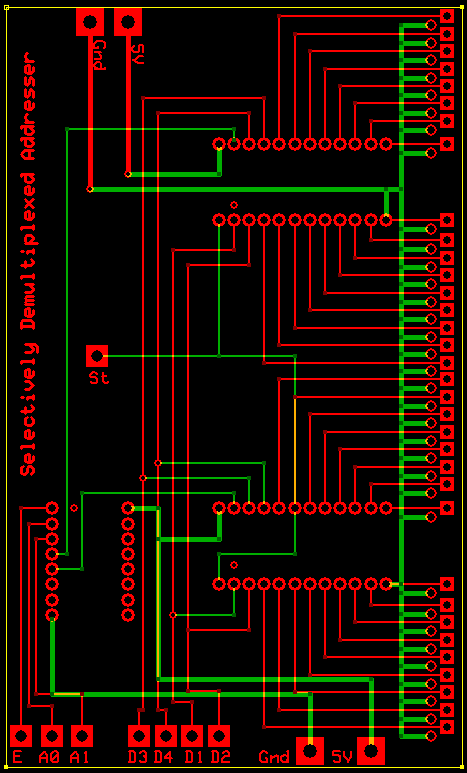
Well that's all from me for a bit. On Wednesday I'm heading to Belize for a week! Gonna romp around in the jungle for a few days 😛
Arduino Adventures :: Day 6
I had been thinking about how to achieve individual addressing using demultiplexers even before I gave Charlieplexing a shot. But during my preliminary research the stumbling block was that the largest demux I could find was only a 4 to 16. If I wanted to individually address 64 LEDs I would need four of these, thats 16 I/O pins required to drive them all (I only have 14 on the Arduino).
So that wouldn't work. I continued to mull about this because there was an itch in the back of my skull telling me it could still work. And then it hit me! As you may or may not know, demultiplexers have a given number of inputs to select which output pin to activate. But they also have an enable pin that can disable the entire demux (so no output pins are active).
My idea was to hook up all of the four demux inputs up in parallel with each other. So pin 1 for each demux would be hooked up in parallel together to one I/O pin on the Arduino, and same for pin 2, 3, and 4. So to drive all four demux's you only need 4 I/O pins on the Arduino. Now the problem with this of course is that if you select pin 8 for output, then pin 8 on every demux will go active.
My solution is to use a smaller 2 to 4 demux, and hook these outputs up to the enable pins on each 4 to 16 demux. So with only 2 I/O pins on the Arduino I can select which Demux is active, and only that one will have an output pin going active.
When all is said and done, I only need 4 pins to drive the 4x16 inputs, and 2 to drive the 2x4 inputs. Thats 6 I/O pins to individually address 64 LEDs 😀
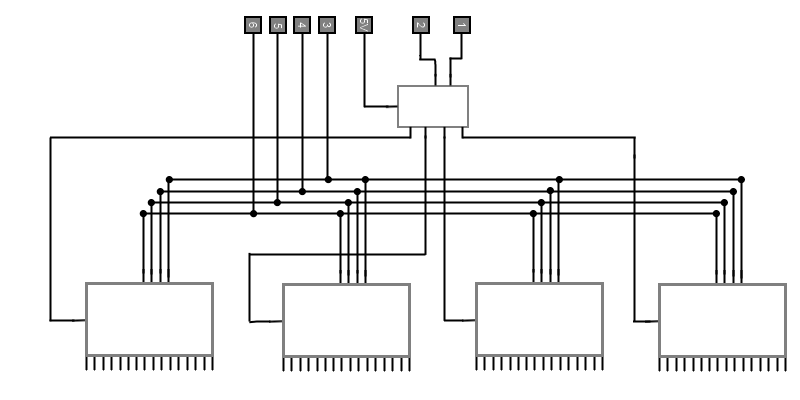
Now my previous exploration of Charlieplexing was far from a waste of time because it got me thinking about Persistence of Visionas a valid way of presenting a static image. Using this demux method for individual addressing of the LEDs, and Persistence of Vision to present a static image, I have a perfect method for engineering my display! Some bonuses of this method over Charlieplexing are:
- The circuit complexity increases linearly as you add more LEDs
- LEDs always get the same amount of current
- The layout lends itself very well to being in a grid!
So with this rough sketch I set forth! It's a real shame that "The Shack" (Formerly known as Radio Shack, they re-branded them selves, seriously) doesn't carry the stuff they used too. They have just a single cabinet of fairly worthless components. It's a real let down. So finding ICs and other small electronics is a real pain these days. Ordering them from sites is an option, but it took some research to find sites that sell in small quantities. I did find a few good ones finally. Shipping time and cost kinda suck, but what can you do.

The first issue I ran into was that nearly every demux was active LOW. Meaning, all unactive output pins were putting out 5V (HIGH), and when you activated one, it would go to 0V (LOW). Thats fine if you have a logic circuit that is all active LOW. But in my case, that would mean that every LED would always be on, and when I addressed one of them, it would actually turn OFF... Not what I wanted 😛
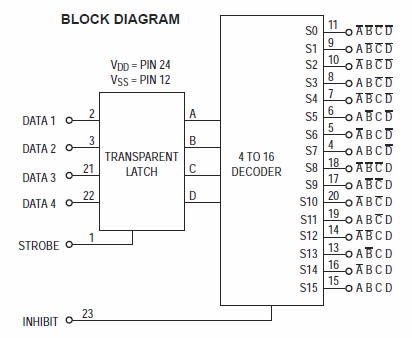
So the only one I found that was active HIGH had a 4bit transparent latch for the input. Not a big deal, kinda cool actually, but it means I need an extra I/O pin for the latch strobe. That puts me at 5 pins rather then 4 for the 4x16 demux's (since i will be hooking all the strobes up in parallel as well), which makes it 7 pins total, well within bounds. The inputs were active HIGH as well, but oddly the enable was active LOW. So if I'm pushing 5V (HIGH) into the enable pins, it DISABLES the demux, and if I drop that to 0V (LOW) it ENABLES the demux.
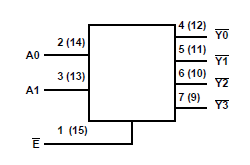
This actually worked to my advantage because every 2x4 demux i could find (whos output would feed into the 4x16 demux's enable pin) were active LOW logic, so every output pin would propagate HIGH until I activated one, which itself would then go LOW.
2 to 4 Demultiplexer : CD74HC139E
4bit Transparent Latch/4 to 16 Demultiplexer : MC14514BCP
As I was saying, the thing that sucks with Radio Shack and every other small eletronics outfit going the way of the Dinosaurs, is the shipping time. If i got a dead IC, or burned one out my self, I'd have to wait another two weeks for a replacement. So i ordered double of everything I needed. (Each IC was only like $0.75, so not a big deal). And to be extra careful, I'm ordering IC sockets, so I won't be soldering the ICs directly.
Now I ordered and received the demultiplexers already. And hooked one of the 2x4s up to my Arduino to test it all out. I haven't worked with ICs let alone demux's in years, so I wanted to test out my self as well as the hardware, to know for sure they all work:
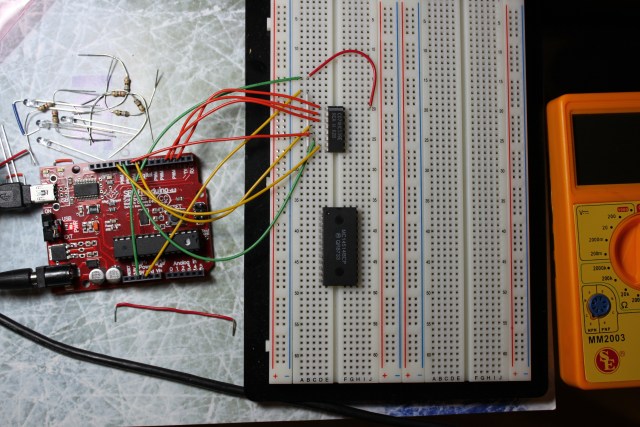
This is being controlled by my computer via serial input, so i can flip the inputs manually, and see the output state instantly. I plan on modifying the program to run through each state automatically and verify the output for each input state. Sort of unit testing the ICs. Then I will do the same for my 4x16's.
Still quite a bit to do before I'm ready to begin the build, but it feels good to have a solid design finally.
Stack Overflow

Me on Flickr
Archives
- May 2012
- March 2012
- February 2012
- January 2012
- December 2011
- November 2011
- October 2011
- September 2011
- August 2011
- June 2011
- May 2011
- April 2011
- March 2011
- February 2011
- July 2010
- March 2010
- February 2010
- September 2009
- May 2009
- May 2008
- November 2007
- October 2007
- September 2007
- July 2007
- May 2007
- April 2007
- March 2007
- February 2007
- January 2007
- December 2006
- November 2006
- October 2006
- September 2006